


Let’s be honest: we’ve all been there. You’re at a bustling coffee shop, desperately trying to juggle a client brief, a spreadsheet, and a reference video on a single 13-inch laptop screen. You end up spending more time clicking between tabs than actually getting work done. It’s cramped, it’s frustrating, and it’s a productivity killer.
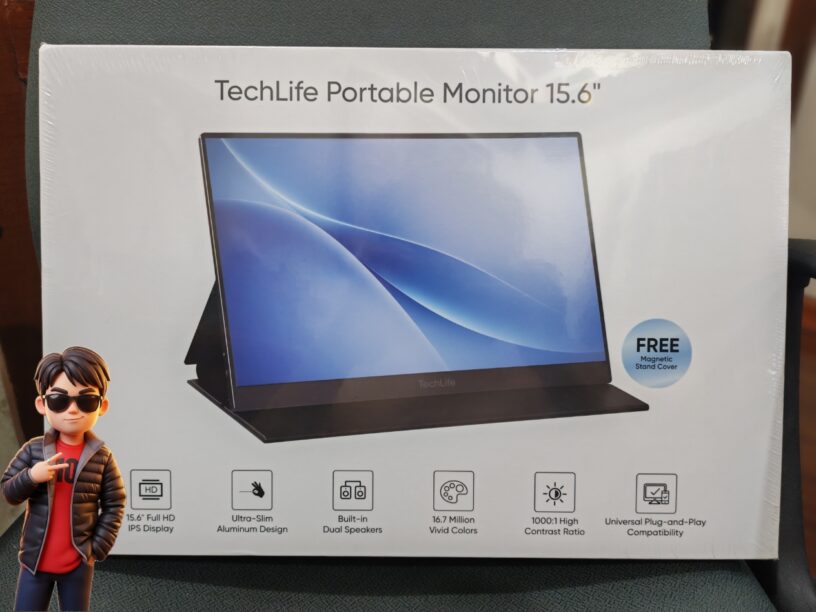
Enter the TechLife Portable Monitor 15.6”. If you’re a freelancer, a student, or a hybrid worker who needs a serious workspace upgrade without hauling around a bulky second monitor, this might just be the game-changer you’ve been waiting for.
Here is why this portable powerhouse deserves a spot in your tech bag.
1. Productivity on Autopilot: Truly Plug-and-Play
The best feature of this monitor is how effortlessly it fits into your existing setup. Whether you’re using a MacBook, a Windows laptop, or even a gaming console, it’s virtually plug-and-play.
- The Workflow Hack: As a creative, I love using it to keep my reference images and client briefs on the secondary screen while my main layout takes over the laptop display. It creates a seamless, dual-monitor environment anywhere.
- Desktop in Your Pocket: If you use a flagship Samsung phone, connecting it to this monitor triggers Samsung DeX mode. Suddenly, your phone becomes a desktop computer, complete with a taskbar and windowed apps—perfect for when you want to travel light without a laptop.
2. Sleek, Modern, and Built for the Road
Nobody wants to carry a heavy brick in their backpack. The TechLife Portable Monitor is incredibly thin (between 5mm to 9mm) and weighs just 710 grams. Even with the included magnetic stand cover, it weighs in at just over a kilogram, making it practically invisible in your bag during your daily commute. The aluminum body also gives it a professional, sturdy feel that looks right at home on any desk.
3. Entertainment and Gaming Made Mobile
It’s not just for emails and spreadsheets! With its Full HD (1920 x 1080) IPS display and a 178-degree viewing angle, it’s a fantastic companion for downtime.
- Game Anywhere: Whether you’re on a Steam Deck, Nintendo Switch, or PlayStation 5, you can get a crisp, large-screen gaming experience even when you’re away from your main TV.
- Smoother Gameplay: It even supports FreeSync to keep your visuals stutter-free, and the built-in speakers provide solid audio when you don’t have headphones handy.
4. A Connectivity Powerhouse
TechLife really thought about organization. All the ports—two USB-C and one Mini HDMI—are located on the right side, which keeps your desk clean and cable-managed.
Tip: You can actually connect two devices at once (e.g., your laptop via HDMI and your phone via USB-C) and toggle between them using the power button. It’s a brilliant way to keep an eye on your messages on one screen while focusing on your main project on the other.
The Verdict: Is It Worth It?
At PHP 7,999, the TechLife Portable Monitor 15.6” hits a sweet spot for those who need a functional, reliable, and affordable second screen. While we would have loved a touchscreen interface, the overall package—including the handy magnetic stand cover and wide device compatibility—makes it an absolute steal for anyone trying to reclaim their productivity.
Quick Tech Specs:
- Display: 15.6” FHD (1920×1080) IPS
- Weight: 710g (Monitor only)
- Connectivity: 2x USB-C, 1x Mini HDMI, 3.5mm Audio
- Compatibility: Laptops (Windows/Mac/Linux), Gaming Consoles, Select Smartphones
Ready to upgrade? You can grab one now! If you’re looking to save even more, keep an eye out for special promos on Lazada, Shopee, and TikTok Shop.
Are you a digital nomad or a student looking to make your study sessions more efficient? Let us know in the comments—how would you use this extra screen space in your daily routine?

- Beyoncé Marks Her Birthday with the Release of a Remastered Deluxe “B’DAY” Album - September 5, 2026
- Acer Unveils New Vero 16 Laptop - September 5, 2026
- Market! Market! | 22 Years of Journeying Through Life with the Community - September 5, 2026


























Leave a Reply