
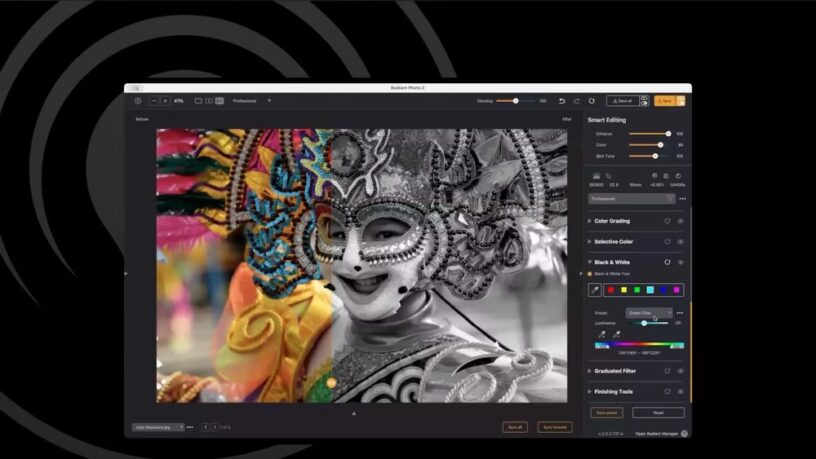



In the world of photo editing, the goal is often simple: create stunning images that look natural and authentic. The latest update from Radiant Photo, version 2.1, is designed to do just that. With a focus on speed, intelligence, and natural results, this new release is packed with features that make the editing process faster and more intuitive than ever before. It’s all about helping you get the most out of the pixels you already have, without relying on artificial, fabricated elements.
So, what’s new in this major quality release? Let’s dive into the highlights and see what makes Radiant Photo 2.1 a must-have for photographers of all levels.
Key New Features and Advancements
Radiant Photo 2.1 is more than just a minor tweak. It’s a deep-dive update that introduces powerful new tools and refines existing ones, all while boosting performance under the hood. Here’s a look at the major new features:
- Zone-Based Black & White Tool: Go beyond simple presets. This new tool offers precise, zone-based control with featherable ranges and partial color options, giving you smooth transitions and clean edges without the need for complex masks.
- Support for Third-Party LUTs: You can now import your own custom LUTs (including
.cubefiles) directly into the “My Looks” panel. This opens up a world of creative possibilities, from emulating classic film stocks to applying your own signature looks. - “Uber” Sliders for Fine-Tuning: The new Develop and Color Grade sliders on the top bar provide one-move, global adjustments. This allows you to quickly dial back or intensify your core corrections and creative looks with a simple gesture.
- Essential EXIF Viewer: Get instant access to critical photo details like camera, lens, focal length, and ISO right inside the app. This helps you make smarter editing decisions and troubleshoot exposure issues at a glance.
- Smarter Noise Reduction: The new “Detailed Scan” feature intelligently analyzes your image and suggests the best noise reduction method for a more natural, appropriate result.
- Enhanced Continuity: The app now remembers your last session. You can now use “Open Recent” to jump back into a project or “Reopen Last Session” to restore your entire working set, ensuring a seamless, non-destructive workflow.
- Faster, Smoother Plug-ins: The Lightroom plug-in now loads significantly faster. Plus, new options like “Keep Running” and “Headless Export” allow for smoother batch processing and a more efficient workflow.
- Improved Apple Photos Workflow: Enjoy a seamless round-trip editing experience with Apple Photos. You can easily edit a photo in Radiant and send it back to Photos with the ability to revert to the original at any time.
- Workflows with Scene-Smart Presets: Now you can import and export your own presets, assigning them to specific scenes (like Portrait or Landscape) to automate your workflow and get a head start on your edits.
- New Creative Packs: The marketplace is expanding with new, specialized “LOOKS” packs, including collections for Newborn & Baby photography and urban-centric tones inspired by Neo Tokyo.
Natural, Not Nuclear: The Philosophy Behind the Update
One of the core principles of Radiant Photo is “pixel integrity.” This means the software is built to be assistive, not generative. Instead of creating fake pixels or fabricated elements, the AI helps you get the most out of the image you actually captured. The result? Edits that feel natural and authentic, allowing your photography to shine.
Radiant Photo 2.1 is a testament to this philosophy. It’s about giving you refined, powerful tools that are easy to use, so you can spend less time tweaking sliders and more time creating.
How to Get the Update
Radiant Photo 2.1 is a free update for all existing Radiant Photo users. To get started, simply open the Radiant Manager application, which you can find in the lower-right corner of the Radiant Photo screen. The manager will check for updates and guide you through the quick installation process.
This release is a direct result of user feedback, with many of the new features and performance fixes inspired by the Radiant Photo community. If you have questions, ideas, or feature requests, join the conversation—your input helps shape the future of the product.

- Why TechLife Portable Monitor 15.6″ Is Your Next Must-Have Upgrade - May 29, 2026
- Golden Haven Zamboanga Crematorium Wins Gold at FIABCI Property and Real PiEstate Excellence Awards 2026 - May 28, 2026
- Palawan Group Brings Services Closer to OFWs at Vibrant Flores de Mayo Festival in Hong Kong - May 27, 2026
























Leave a Reply